In this post under Java LDAP, I will show how to create a sub context with an example
In LDAP, sub context means a new LDAP entry under another existing LDAP entry or context.
Below is the screenshot of LDAP DIT (Directory Information Tree)
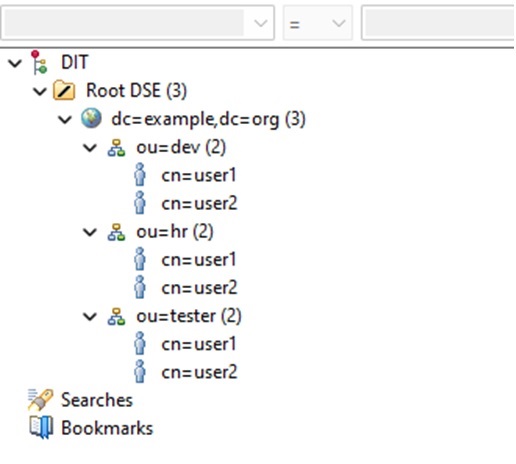
I will show two approaches that can be used to create an ldap entry.
We will create two new LDAP entry with dn as “cn=user3,ou=dev,dc=example,dc=org” and “cn=user4,ou=dev,dc=example,dc=org” under existing LDAP entry with dn as “ou=dev,dc=example,dc=org”
Main Class
1  package package3;
2
3  import java.util.Hashtable;
4
5  import javax.naming.Context;
6  import javax.naming.NamingException;
7  import javax.naming.directory.*;
8
9  public class LDAPDemo3 {
10     public static void main(String[] args) {
11         Hashtable<String, Object> env = new Hashtable<String, Object>();
12         env.put(Context.INITIAL_CONTEXT_FACTORY, "com.sun.jndi.ldap.LdapCtxFactory");
13         env.put(Context.PROVIDER_URL, "ldap://localhost:1389");
14         env.put(Context.SECURITY_PRINCIPAL, "cn=admin,dc=example,dc=org");
15         env.put(Context.SECURITY_CREDENTIALS, "adminpassword");
16         DirContext ctx = null;
17         try {
18             ctx = new InitialDirContext(env);
19
20             //First approach
21             Attributes attributes = new BasicAttributes();
22
23             BasicAttribute objectClassAttribute = new BasicAttribute("objectClass");
24             objectClassAttribute.add("top");
25             objectClassAttribute.add("person");
26             attributes.put(objectClassAttribute);
27
28             BasicAttribute cnBasicAttribute = new BasicAttribute("cn", "user3");
29             BasicAttribute snBasicAttribute = new BasicAttribute("sn", "user3");
30             attributes.put(cnBasicAttribute);
31             attributes.put(snBasicAttribute);
32
33             String dn = "cn=user3,ou=dev,dc=example,dc=org";
34
35             ctx.createSubcontext(dn, attributes);
36
37             //Second approach
38             ctx = (DirContext) ctx.lookup("ou=dev,dc=example,dc=org");
39             attributes = new BasicAttributes();
40
41             objectClassAttribute = new BasicAttribute("objectClass");
42             objectClassAttribute.add("top");
43             objectClassAttribute.add("person");
44             attributes.put(objectClassAttribute);
45
46             cnBasicAttribute = new BasicAttribute("cn", "user4");
47             snBasicAttribute = new BasicAttribute("sn", "user4");
48             attributes.put(cnBasicAttribute);
49             attributes.put(snBasicAttribute);
50
51             ctx.createSubcontext("cn=user4", attributes);
52         } catch(NamingException excep) {
53             excep.printStackTrace();
54         } finally {
55             if(ctx != null) {
56                 try {
57                     ctx.close();
58                 } catch(NamingException excep) {
59                     excep.printStackTrace();
60                 }
61             }
62         }
63     }
64 }
In the above code, at line 18 we create an authenticated initial context.
From line 21 to 35, I will show the first approach using which I create an ldap entry with dn “cn=user3,ou=dev,dc=example,dc=org”
At line 23, we create an attribute “objectClassAttribute” by creating an instance of “BasicAttribute”. This attribute will have multiple values, so we call “add” method twice, one for each new value. The constructor will take attribute name as argument.
At line 28, we create another attribute “cnBasicAttribute” by creating an instance of “BasicAttribute”. Since it has only one value, we can use another version of constructor which takes attribute name and value as arguments.
At line 29, we create another attribute “snBasicAttribute” by creating an instance of “BasicAttribute”. Since it has only one value, we can use another version of constructor which takes attribute name and value as arguments.
We then add these attributes to an instance of “Attributes” class, which is used for containing a list of attributes. This instance was created at line 21 and the three attributes are added to it at line 26, 30 and 31.
At line 33 we create a Distinguished Name (dn) for the new ldap entry.
At line 35, we create a new sub context under the existing context with dn “ou=dev,dc=example,dc=org” by calling “createSubcontext” method and passing the new dn and attributes as arguments.
From line 37 to 51, I will show another approach using which I create an ldap entry with dn “cn=user4,ou=dev,dc=example,dc=org”.
First at line 38, I use the “lookup” method to get the reference to parent context under which the new ldap entry has to be added which in this case is “ou=dev,dc=example,dc=org”. Assign the reference to “ctx” variable
As done in the first approach I create similar attributes from line 39 to 49.
At line 51, I call the “createSubcontext” method on the “ctx” object and only pass the “cn” value. Since “ctx” is referring to the context “ou=dev,dc=example,dc=org”, a new ldap entry under “ou=dev,dc=example,dc=org” with dn “cn=user4,ou=dev,dc=example,dc=org” is created.
At line 57, we close the context.
In this way we can create new contexts or ldap entries.

 Code Recipes Blog