In this post under Java LDAP, I will show with example how to perform a basic search for entries in LDAP.
I have below ldap tree. In this ldap tree under development department with dn “ou=dev”, I have three developers “user1”, “user2”, and “user3”. “user1” has “description” attribute with value “Software
engineer 2″ whereas “user2” and “user3” has “description” attribute value “Software engineer 1”.
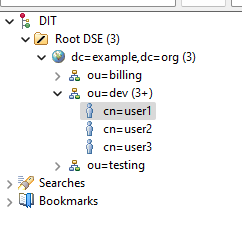
I will write a code which will search and return records that will have “description” equal to “Software engineer 1”, which in this case is “user2” and “user3”.
Below is the complete Java code for your reference.
Main Code
1  package package10;
2
3  import javax.naming.Context;
4  import javax.naming.NamingEnumeration;
5  import javax.naming.NamingException;
6  import javax.naming.directory.*;
7  import javax.naming.ldap.LdapContext;
8  import java.util.Hashtable;
9
10 public class LDAPDemo10 {
11     public static void main(String[] args) {
12         Hashtable<String, Object> env = new Hashtable<String, Object>();
13         env.put(Context.INITIAL_CONTEXT_FACTORY, "com.sun.jndi.ldap.LdapCtxFactory");
14         env.put(Context.PROVIDER_URL, "ldap://localhost:1389");
15         env.put(Context.SECURITY_PRINCIPAL, "cn=admin,dc=example,dc=org");
16         env.put(Context.SECURITY_CREDENTIALS, "adminpassword");
17
18         DirContext dirContext = null;
19         try {
20             dirContext = new InitialDirContext(env);
21
22             Attributes attributes = new BasicAttributes();
23             attributes.put("description", "Software engineer 1");
24
25             NamingEnumeration<SearchResult> searchResultNamingEnumeration = dirContext.search("ou=dev,dc=example,dc=org", attributes);
26
27             while(searchResultNamingEnumeration.hasMore()) {
28                 SearchResult searchResult = searchResultNamingEnumeration.next();
29                 System.out.println(searchResult);
30             }
31         } catch(Exception excep) {
32             excep.printStackTrace();
33         } finally {
34             if(dirContext != null) {
35                 try {
36                     dirContext.close();
37                 } catch(NamingException excep) {
38                     excep.printStackTrace();
39                 }
40             }
41         }
42     }
43 }
In the above code, first I get the connection to the ldap root tree and store that connection in variable “dirContext”. Refer from line 12 to 20.
Since I am searching for record with attribute “description” and value “Software engineer 1”. I will create an instance of “BasicAttributes” with those two values. Refer to line 22 and 23.
At line 25, I call “search” method available on “dirContext” instance. I will pass two arguments
1) The location or context or the dn where to do the search
2) The attributes instance created at line 22.
The “search” method will return an instance of “NamingEnumeration<SearchResult>” class.
From line 27 to 30, we loop through the search results and print the value of each “SearchResult” entity in the enumeration.
In this way we search for entries having particular attribute and value in the ldap tree.
Below is the output
Output
cn=user2: null:null:{description=description: Software engineer 1, objectclass=objectClass: person, top, sn=sn: user2, cn=cn: user2}
cn=user3: null:null:{description=description: Software engineer 1, objectclass=objectClass: person, top, sn=sn: user3, cn=cn: user3}
 Code Recipes Blog